The purpose of the Vendors section in RiskXchange is to assist users in managing their vendors by providing a comprehensive onboarding process for third-party vendors. RiskXchange helps integrate new vendors smoothly and ensures that they align with the user's cybersecurity standards and practices. It provides visibility into the cyber posture and security maturity of these vendors, allowing users to identify and address potential security risks in a timely manner. RiskXchange also offers security maturity assessments and compliance-based assessments, along with explanations and background information on the evaluation results. This helps users understand their cybersecurity status and make informed decisions regarding their vendors.
Types of Vendor Connections
RiskXchange supports two types of vendor connections:
- Full Connection
A full connection offers:
- Continuous monitoring of the organization’s cybersecurity posture.
- Access to comprehensive compliance information.
- The ability to send out standards-based risk or compliance assessments, as well as custom assessments for additional requirements such as ESG (Environmental, Social, and Governance) and credit risk.
- Monitored Connection
A monitored connection provides:
- A continuously updated risk score for the organization, with updates occurring once per week.
- Detailed, actionable insights based on the organization’s external attack surface and public domain data.
Adding a Vendor to RiskXchange
Follow these steps to add a vendor to your portfolio:
- Navigate to the Vendors menu item.
- Click on the Add Vendor Button.
- A dialogue box will appear, prompting you to enter the name of the company you wish to add.
- Search for the Company. If the company is already in RiskXchange’s network, select it from the search results to add it to your connection portfolio.
If the company is not found, choose the option “Company Not in Search Results?” to proceed.
- Provide Company Details-you will be directed to a form to register the company. Provide details such as the company name, contact information, industry, and any other required information.
- Choose the connection type (Full or Monitored) to ensure accurate classification.
- Submit the Form
RiskXchange will evaluate the company’s security parameters and generate a risk score within 24 hours.
Suggested Vendors
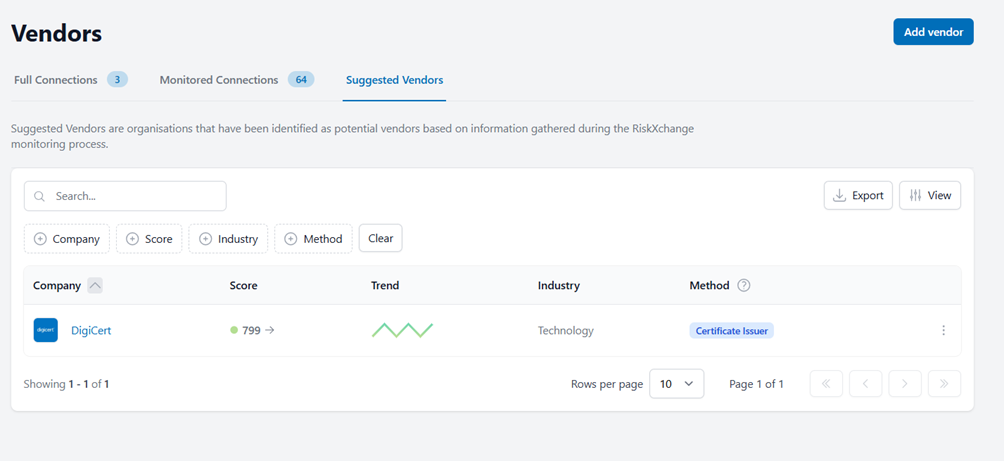
RiskXchange proactively identifies potential vendors for your organization based on information gathered during its monitoring process. By leveraging this feature, users can make informed decisions when selecting new vendors to work with.
The Vendors section in RiskXchange is a critical tool for organizations aiming to maintain a secure, compliant, and efficient vendor ecosystem. By providing comprehensive onboarding, continuous monitoring, and actionable insights, RiskXchange empowers users to manage their third-party vendors confidently and effectively.