The Questionnaires section of the RiskXchange platform is designed to streamline the assessment process for connections and groups.
Questionnaires allow your organisation to easily participate in various security, privacy, and compliance assessments.
The primary goal of the Questionnaires is to provide organizations with a comprehensive overview of their third-party cyber security posture and maintain a proactive approach to risk management.
Types of Questionnaires
RiskXchange offers two types of questionnaires:
- Shared Questionnaires
- Accessible to all users.
- Include standardized assessments such as RX Essentials, RX Environmental, Social, and Governance (ESG), and GDPR Vendor Assessment.
- Private Questionnaires
- Tailored specifically for your organization and vendors.
- Customized based on specific questions shared with the RiskXchange team.
- Exclusively sent to full connections for secure and targeted assessments.
How to Share Private Questionnaires:
Option 1: Along with the invitation for a vendor to join the platform as a connection for your company.
Option 2: Directly through the platform:
- Navigate to the Vendors menu.
- Select one of your full-connection vendors.
- Click on the Actions button and choose Send Questionnaire.
- Select the desired questionnaire, specify the frequency of vendor updates, add at least one recipient’s contact details, and send it.
Group Sharing:
- Questionnaires can be sent to portfolios (groups) on the RiskXchange platform, enabling quick and efficient assessments across multiple connections. Ensure that all accounts within the portfolio have assigned users; the system will automatically send the questionnaire to vendors' administrators.
Once a vendor completes the questionnaire, it is automatically scored, and you will receive an email notification indicating that the assessment is ready for review.
Sorting and Information Display
To simplify navigation and enhance clarity, questionnaires are organized based on their completion status (Complete or Incomplete). Each questionnaire entry includes the following details:
- Requester: The individual or entity that initiated the questionnaire.
- Privacy Status: Indicates whether the questionnaire is shared or private.
- Progress Bar: Displays the completion status.
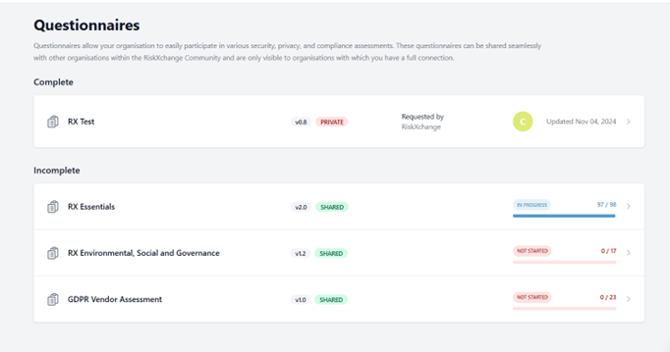
This structured arrangement provides users with a quick overview of ongoing and completed assessments, making it easier to track progress and prioritize tasks.
Maximizing the Questionnaires Feature
By effectively configuring and monitoring questionnaires, users can stay updated on changes in their connections’ security postures and take swift actions to mitigate risks. Key recommendations:
- Regularly review updates from vendors to ensure alignment with security requirements.
- Leverage group sharing to streamline the assessment process for multiple vendors.
Important Notes
Certain features and settings may vary based on your user role within the RiskXchange platform. Ensure you have the necessary permissions to access and configure these options.
Conclusion
Questionnaires feature on the RiskXchange platform is a powerful tool for streamlining third-party risk assessments, ensuring organizations can efficiently evaluate and monitor their vendors’ security postures. By leveraging both shared and private questionnaires, along with the ability to share assessments across groups, organizations can maintain a proactive and structured approach to risk management. Consistently reviewing questionnaire results and utilizing the platform’s automation capabilities will help businesses strengthen their cybersecurity framework and maintain compliance with industry standards.