RiskXchange platform streamlines and organizes your approach to managing your company’s certifications. This comprehensive feature ensures that all certifications are not only stored securely but also managed efficiently, keeping you informed and proactive about renewals.
Adding New Certifications
To add a new certification or standard, follow these steps:
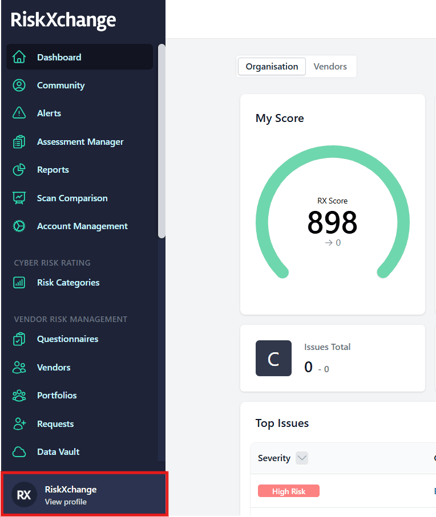
Open your Overview. At the very bottom of the sidebar, click the View Profile button.
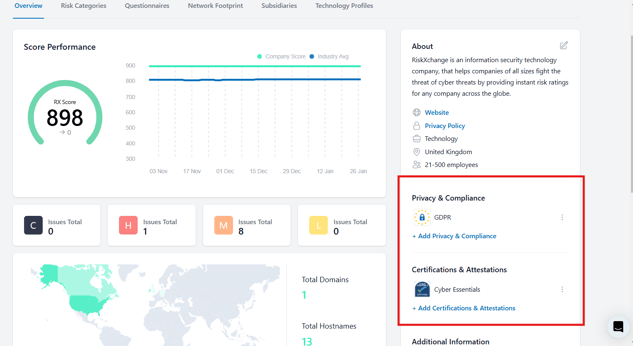
Simply click on the Add Privacy & Compliance or Add Certifications & Attestations button, select the document you wish to add, upload the file containing the certificate, and click Submit.
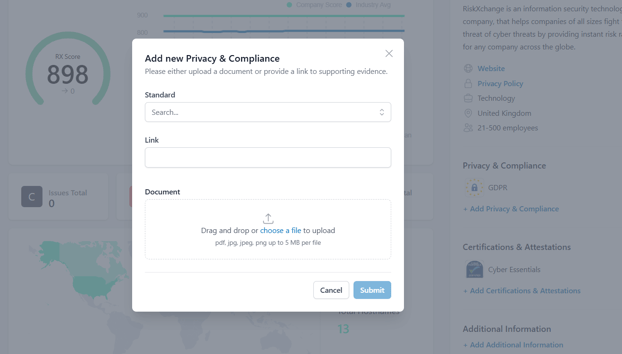
The new certification will then appear alongside the other certifications your company has obtained.
Advanced System Features
Automated Renewal Reminders
RiskXchange not only securely stores your certifications but also reads metadata from them. This metadata is used to track the expiration dates of your certifications. Starting two months before a certificate’s expiration date, the system sends automated reminder notifications. This ensures you have ample time to renew certifications and avoid compliance lapses, eliminating the need for manual monitoring.
Accreditation Verification
To further enhance trust and reliability, RiskXchange verifies the issuing organization of your certifications. This verification process ensures that the organization is legitimate and accredited to issue such documents, safeguarding your company’s reputation and compliance integrity.
This feature on RiskXchange is a vital tool for maintaining an organized, secure, and efficient certification management process. Benefits such as automated reminders and issuer verification eliminate manual hassles and enhance your organization’s compliance readiness.For any additional questions, please contact out Support Team at support@riskxchange.co.