Getting Started on RiskXchange
1. Overview
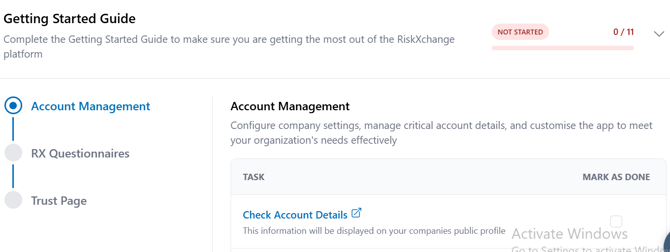
The Getting Started feature is designed to help new users quickly onboard and navigate the key areas of the RiskXchange platform. It ensures you complete the essential setup steps, maximize the value of the platform, and access helpful resources.
- Provides a step-by-step guide to configure your account, complete questionnaires, and set up your Trust Page.
- Ensures you get the most out of the platform by directing you to key areas.
- Includes links to resources and documentation for deeper guidance.
- Always accessible from the banner at the top of the page, visible across all navigation routes.
- You can also access it anytime by clicking the Book icon in the top right corner.

2. How It Works
- When you open the Getting Started page, you’ll see a stepped workflow.
- Each step links to a specific task for you to complete.
- After completing a task, return to the guide and mark it as done.
- Once all tasks are complete, you’ll see a completion message (this can be dismissed).
3. Step-by-Step Guide
Step 1: Account Management
Configure your company settings, manage account details, and set up vendor and user management.
Tasks:
✅ Check Account Details – Ensure company information is accurate (this will be shown on your public profile).
✅ Add Additional Domains – Add all domains associated with your account.
✅ Add Additional Hostnames – Include any hostnames you want to scan.
✅ Manage Tags – Create tags to organize vendors, domains, and hostnames.
✅ Configure Vendor Tiers – Categorize vendors by risk level.
✅ Manage Users – Add users and assign access levels.
Step 2: RX Questionnaires
Strengthen your security profile with RiskXchange’s standardized assessments.
Tasks:
✅ RX Essentials – Complete the core internal security assessment.
✅ RX ESG Assessment – Evaluate Environmental, Social, and Governance risks.
✅ GDPR Vendor Assessment – Assess vendor compliance with GDPR requirements.
Step 3: Trust Page
Your Trust Page lets you securely share your company’s security and compliance posture with customers.
Tasks:
✅ Complete Your Trust Page – Add information you wish to share.
✅ Enable Your Trust Page – Activate your page so customers can view it.
4. Benefits of Completing the Guide
- Ensures all critical setup steps are covered.
- Provides a structured workflow so nothing is missed.
- Strengthens your security and compliance profile from the start.
- Builds trust with vendors and customers via transparent sharing.
- Enables easier portfolio management and benchmarking.
5. Quick Access & Resources
- Access anytime via the banner at the top of your page.
- Or click the Book icon in the top right corner of the platform.
- Explore additional helpdesk resources for deeper guidance on each step.