The Account Management section in the RiskXchange app is a centralized space designed to help users configure their company settings, manage critical account details, and customize the app to meet their organization's needs effectively. Below, we’ll explore each subsection in detail, providing a comprehensive understanding of its features and functionality.
1 . Account Details
This subsection allows users to input and maintain essential information about their company. These details are displayed on your company’s public profile and can be updated anytime.
Fields include:
- Company Name
- A link to your organization’s website.
- A direct link to your privacy policy.
- Primary Location.
- Industry/Sector.
- The size of your organization in terms of employees or scale.
- Space for a descriptive overview of your company.
This subsection ensures that your organization’s profile is both informative and professional.
2. DomainsLists all domains associated with your account. You can also customize views and filter the list to have a better overview of your domains and scans. If you need to add an additional domain, simply submit a request, and our team will take care of it.
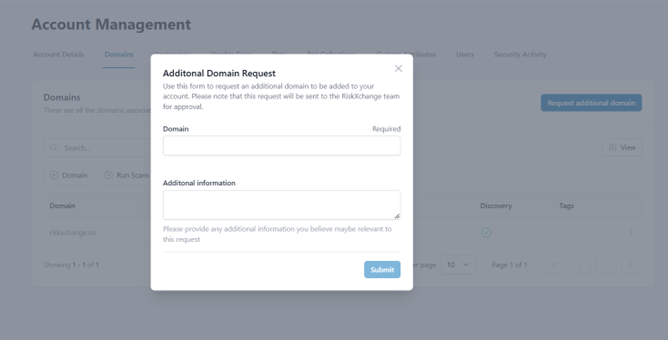
These are all the hostnames associated with your account and the filters allowing you to navigate more precisely through the list. You also have a Hostname status indication (Active inactive) and Scan status (Yes/No) along with the option to export the list in Excel.
4. Vendor TiersVendor Tiers enable your organization to categorize vendors based on their risk profiles effectively. Each tier can be customized to align with your internal risk assessment framework.
Features:
- Categorize vendors into tiers: Critical, High, Medium, or Low.
- Customize the tier labels to match your organization’s terminology.
- Adjust the number of tiers according to your requirements.
5. Tags and Tag CollectionsTags and their collections provide a flexible way to organize and categorize connections and groups within the app.
Capabilities:
Create tags with a name, description, and color for easy identification.
Group tags into Collections to simplify management and usage.
Use tags to:
Organize Connections/Groups: Quickly locate specific connections or groups.
Filter Alerts: Streamline searches by applying relevant tags.
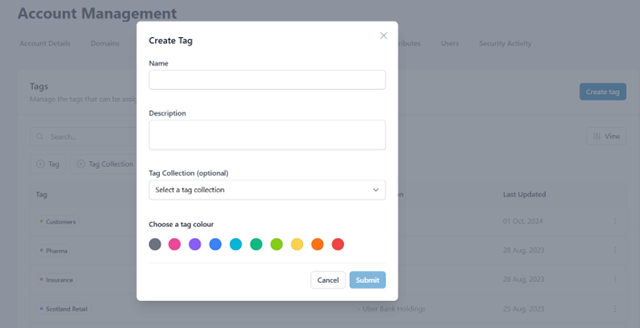
This feature makes it easier to maintain a well-structured overview of connections and alerts within your account.
6. Custom AttributesThe Custom Attributes subsection allows you to enhance vendor profiles with tailored fields that meet your unique business requirements. These attributes also improve filtering and categorization, making it easier to assess and manage vendors.
7. Users
This section enlists all users of your organization and allows you to view existing users and their roles, add new ones, and search the users by keyword or filter.
8. Security ActivityThe Security Activity section provides visibility into the security-related actions within your account.
Insights Include:
- Recent login activity.
- Security events performed by your organization’s members.
- Exporting security activity logs for compliance or internal reviews.
The Account Management menu is an indispensable tool for tailoring the RiskXchange platform to your company’s needs, ensuring that your account is both functional and secure. For any additional support or queries, feel free to reach out to our team support@riskxchange.co!