This guide is designed to help vendors understand the key features and functionalities of the platform, particularly for free accounts. RiskXchange aims to empower you with the tools and insights needed to maintain a robust cybersecurity posture.
Understanding the Score
Your RiskXchange score is a critical indicator of your organization’s cybersecurity risk. It is one of the primary metrics that companies assessing your organization will review. Here are the key details about the score:
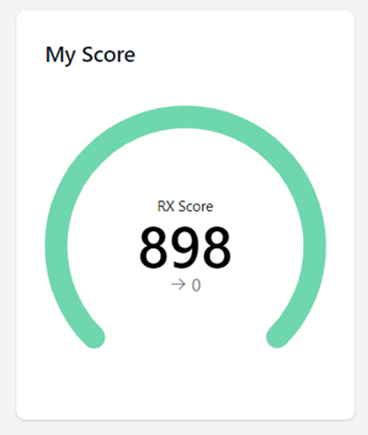
- Range: The score ranges from 300 (highest risk) to 900 (lowest risk).
- Frequency: Score is updated weekly.
* If you make any corrections and need to view the latest updates, you can submit a ticket to request an additional scan. The updated score will be available within 24 hours.
- Calculation: The score is determined by aggregating points across multiple categories, each with a specific percentage weight contributing to the overall score.
If your score drops or a new issue arises, the account administrator will receive an email notification. It is essential to monitor these notifications and address any highlighted issues promptly.
Issues
The Issues section serves as a centralized hub for detecting and addressing cybersecurity concerns within your organization’s framework.

Key features of the Issues section include:
- Categorization by Severity: Issues are sorted based on their severity, allowing you to prioritize remediation efforts effectively.
- Top Issues Bar: Recent and critical issues are displayed prominently in the Top Issues Bar.
- Details Provided: Each issue includes a brief explanation, its category, and the number of affected hosts. Clicking on “View details” provides information to guide remediation efforts.
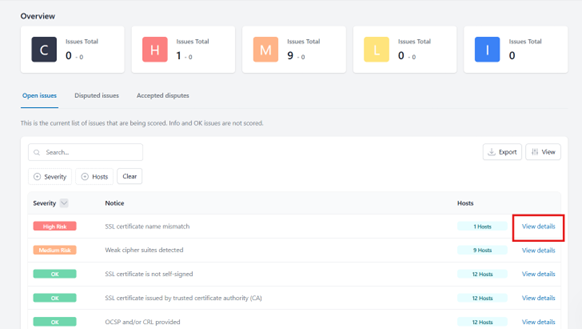
We strive to provide comprehensive details to help you address issues effectively and communicate them to your technical team.
Disputing Issues
If you encounter an issue that you believe is incorrect, you can raise a dispute.
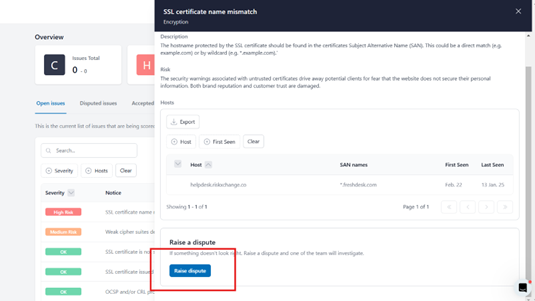
Our team will perform a manual review and provide detailed feedback or findings based on our investigation.
Connections
The RX platform offers two types of connections to enhance your third-party risk management capabilities: Full Connections and Monitored Connections.
Monitored Connections
Continuous Risk Scoring: Stay updated with real-time risk scores of the monitored organization.
Actionable Insights: Access detailed recommendations to address identified risks.
External Data Insights: Data is collected from public domain sources and the organization's external attack surface.
Privacy: The monitored company remains unaware of being tracked.
Full Connections
Purpose: For companies to establish a more comprehensive risk management relationship.
Continuous Monitoring: Keep an ongoing check on the organization's risk profile.
Compliance Insights: Gain access to a broad range of compliance information.
Risk Assessments: Send out standards-based or custom risk assessments.
Additional Coverage: Address requirements like ESG (Environmental, Social, and Governance) and credit risk.
Note: A request must be submitted by the assessing company to establish a Full Connection.
Receiving and Accepting Full Connection Requests
As a vendor, you may receive a Full Connection request in one of two ways:
Existing Platform Users:
If you are already using the RX platform as part of your company account, you will receive the request in the Requests menu.
New Platform Invites:
If you are not yet on the RX platform, you may receive the Full Connection request along with an invitation to join the platform as a user.
Important: Once you accept the Full Connection request, the company that initiated the request will have full visibility into your risk and compliance data.
Account Management
This section includes the following:
- Domain: Displays your website domain.
- Hostnames: Shows all the hostnames identified during the discovery process. If any hostnames are missing, you can request to add them by clicking “Add a hostname.” Our support team will handle the update.
- Users: To add additional users, click the “Add User” button, provide their contact details, select their permission level (Contributor, Read-only, or Admin), and send an invitation to join your account.
Questionnaires
The platform features two types of questionnaires to help you demonstrate compliance and address company-specific requirements:
1. Shared Questionnaires: These include standard assessments such as RX Essentials, RX Environmental Social and Governance, and GDPR Vendor Assessment.Accessibility: Shared questionnaires are accessible to all users within the platform or specific user groups as designated by the organization. They can be reused across multiple vendors, partners, or assessments.
Visibility: These questionnaires are visible to all users allowed to access the public library in the system. They are often standardized or based on industry frameworks, such as ISO 27001 or NIST.
Maintenance: Updates to shared questionnaires are reflected universally for all users leveraging them.
2. Private Questionnaires: These are specific to the company you are connected with and must be completed as required.Accessibility: Restricted to specific users or teams within an organization. Typically used for assessments tailored to specific vendors, partners, or unique organizational needs.
Visibility: Only visible to the users or teams who created or are granted access to them. Not part of the shared library and cannot be accessed by others unless explicitly shared.
Purpose: Designed for customized assessments. Useful for addressing unique risk areas or obtaining vendor-specific information.
Maintenance: Updates to private questionnaires are controlled and managed locally by the creator or their team, without affecting other users or assessments.
Once a questionnaire is completed, it is automatically scored. The connected company (which requested to complete it) will receive an email notification indicating that the assessment is ready for review.
By staying proactive and leveraging the platform’s tools, you can enhance your organization’s cybersecurity posture and build trust with your connected partner. If you have any further questions and need additional help, contact our Support Team via support@riskxchange.co. We are always happy to help you.